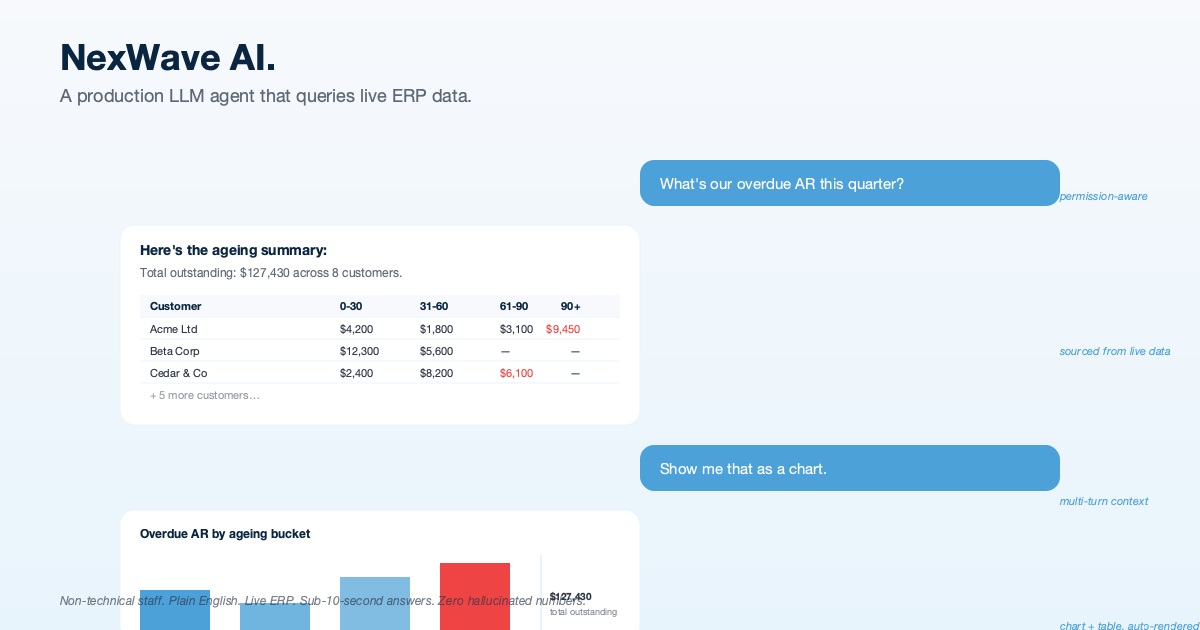
NexWave AI: An AI Assistant That Answers Plain-English Questions From a Live ERP
We embedded an AI assistant inside a live ERP used by NZ and AU businesses. Staff ask questions in plain English (overdue receivables, top customers, paid invoices) and get accurate answers backed by their own data, with charts, tables, and clickable source documents. No reports to navigate, no SQL, no training course.
Background
New Zealand and Australian businesses running NexWave (an ERP platform for the NZ/AU market) face a familiar problem: the data they need is in the system, but getting it out requires knowing which report to run, which filters to apply, and how to interpret the output.
An operations manager who just wants to answer “what are our overdue receivables?” has to remember that the right report is Accounts Receivable Summary, that it needs a company filter, that ageing buckets default to 30/60/90/120 days, and that the result has to be exported to Excel to be shareable. A finance director who wants a year-on-year P&L comparison has to run the report twice with different fiscal year filters and stitch the numbers together by hand.
HighFlyer was asked to close that gap. The brief was deceptively simple: make the ERP answer questions in plain English, with charts and tables, accurately, without making numbers up, and without letting users see data they are not authorised to access.
The Challenge
Building an AI assistant that reads from a live business system is not the same as wiring a chatbot up to a help-centre. Five things made it harder than the marketing demos suggest:
- Truth matters. Finance teams cannot tolerate made-up numbers. Every figure the assistant produces must come from a real query against the live data, traceable back to the source document.
- Permissions must be honoured. ERP data is role-scoped. A warehouse staff member should not be able to ask the AI “show me all salaries” and get an answer. The assistant has to use the same permissions as the user who is asking.
- Long conversations have to be trimmed carefully. Without care, a long conversation eventually exceeds what the AI can hold in its head, and the naive way to shorten it corrupts the conversation and crashes the assistant.
- Failures are normal. Outages, rate limits, missing credentials, oversized conversations all happen in production. The assistant cannot just stop working when any of these occur.
- Output must be presentable. Raw data dumped into a chat is not an answer. Users need formatted tables, charts, and clickable links to the source documents so they can verify what they have been shown.
The Solution by HighFlyer
We designed and shipped NexWave AI: an AI assistant embedded directly inside the NexWave web interface. It listens for plain-English questions, looks up the answer in the live data, runs any necessary calculations through a real calculator (not the AI’s own arithmetic), and renders the result as tables, charts, and clickable links.

How It Is Organised
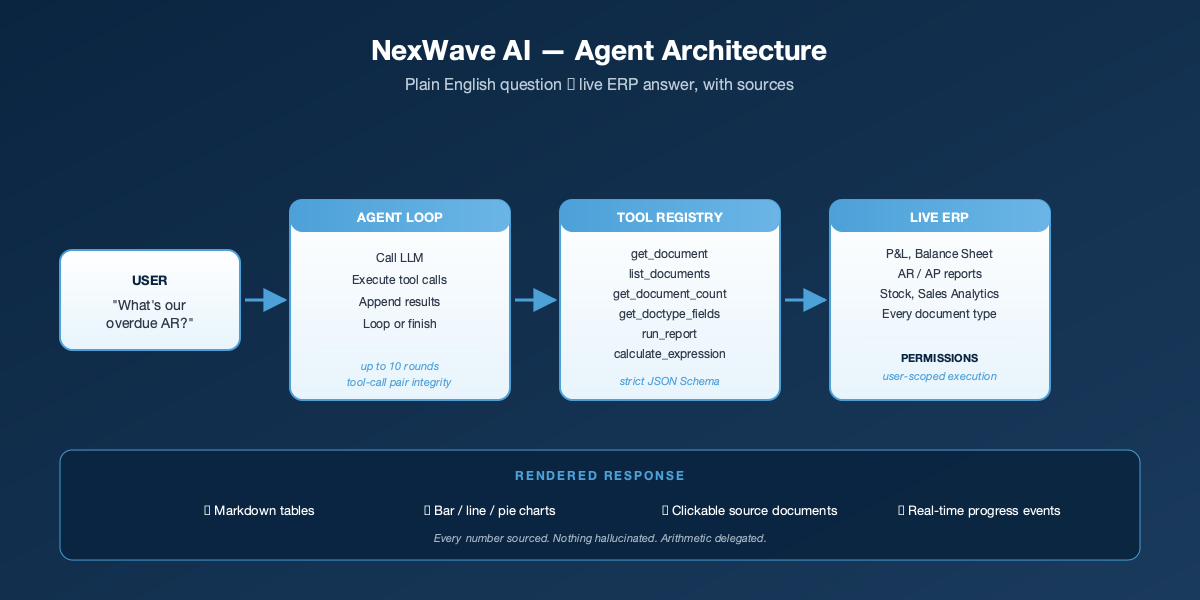
The assistant has four layers, each with a clear job:
- The conversation manager. Sits between the user and the AI, trims long conversations safely, and applies a cap of ten back-and-forth rounds per question so a stuck assistant never burns through your budget silently.
- The look-up library. A small, deliberately limited set of six things the AI is allowed to do: fetch a document, list documents, count documents, inspect the fields on a record type, run a pre-defined ERP report, and do exact arithmetic through a real calculator. Nothing else. The AI cannot write to your data, cannot run arbitrary code, and cannot reach outside the ERP.
- The permission gate. Every look-up runs as the signed-in user, using the same permissions the ERP already enforces. If a user cannot see something through the normal interface, the AI cannot surface it for them either.
- The rendering layer. Responses come back to the chat as neat tables, bar / line / pie / donut charts, and clickable links to the underlying records. Users can verify any answer in one click.
Why the Calculator Tool Matters
AI models are not calculators. Ask one to sum a column of thirty numbers and the answer will usually be within a dollar or two, occasionally further off. Finance teams notice that kind of mistake immediately, and they are right to.
We built a small dedicated calculator into the assistant. The AI is forbidden from doing arithmetic in its head and must instead pass any sum, percentage, or growth rate through the calculator. Reports that come back from the ERP already include their own totals where possible, so the AI is told to use those directly rather than re-summing. The result is that the maths is always right, because the AI is not the thing doing the maths.
Permissions Stay Where They Are
The most dangerous design choice in this project would have been to run the assistant’s queries as a super-user. We did not do that.
If the assistant runs as a super-user, you immediately need a second permission system on top of the ERP’s, deciding what the AI is allowed to surface. That second system inevitably drifts from the first, and sooner or later someone sees data they should not have seen. Our assistant uses the ERP’s own permission system, exactly as it is. If a sales rep cannot run the Profit and Loss Statement themselves, neither can the AI when they ask. There is no second permission model to maintain, because there isn’t one to begin with.
Production-Grade Details
The hard part of an AI assistant in production is not getting the demo to work. It is everything around the edges. A short summary of what we built into NexWave AI to make it reliable enough to put in front of customers:
- Long conversations are trimmed safely. Question-and-answer pairs are kept together; trimming never produces a half-conversation the AI cannot follow.
- Errors are handled specifically. A missing API key gets one message. A rate-limited provider gets another. An oversized conversation tells the user to start a new one. A misbehaving look-up is logged for engineers and reported to the user in plain English.
- Runaway loops are stopped. If three consecutive look-ups fail, the assistant stops and says so, rather than continuing to retry while the user waits.
- Live progress is visible. While the assistant is thinking, fetching, or calculating, the chat interface shows what it is doing in real time. “Running Accounts Receivable…” is more reassuring than a spinner.
- Sources are always cited. Every document name in an answer is rendered as a clickable link to the actual record in the ERP. Users can verify everything they are shown.
There is a companion blog post that walks through these decisions in more depth. See What We Learned Putting an AI Assistant Inside a Live Business System.
The Results
The result is an AI assistant working live inside an ERP used by NZ and AU businesses. It answers questions like:
- “What’s our P&L for this fiscal year, broken down monthly?”
- “Who owes us more than $10,000 and is more than 60 days overdue?”
- “Show me the top 5 customers by revenue this quarter as a chart.”
- “What’s the current stock balance across all warehouses?”
- “Find Sales Invoice SI-00456 and tell me if it’s been paid.”

Non-technical staff get answers in seconds that previously required navigating to the right report, applying filters, and interpreting the output. Every figure is cited back to the source document so users can verify anything they are shown.
Technology Stack
- Python for the assistant’s logic
- OpenAI SDK pointing at OpenRouter so we can swap between frontier models without rewriting the assistant
- Frappe v15 as the underlying application framework
- Real-time publish/subscribe for the “thinking, running, calculating” progress updates
- Markdown + chart blocks for the rendering conventions the chat interface understands
- Chart.js-compatible chart payloads for the visualisations
Why This Matters for New Zealand Businesses
Most “AI for business” products are either glorified document search, or general-purpose chatbots that invent numbers the moment you ask something specific. An AI that actually touches the systems where the numbers live, with the permission model intact and the arithmetic delegated to a real calculator, is a different category of tool.
We built NexWave AI because NZ and AU businesses using NexWave told us their operations staff were being held up by the time it takes to get an answer out of the ERP. The goal was not to replace analysts. The goal was to give every staff member the ability to ask a question and get a correct, sourced answer in seconds.
That is what this ships.
Conclusion
Building an AI assistant that an operations team can actually trust is not the same as building a demo. Every detail above (the deliberately small set of look-ups, the dedicated calculator for arithmetic, the reuse of the ERP’s existing permissions, the careful handling of long conversations, the specific error messages, the clickable source citations) is a place where a prototype would have been fine and a real production tool would have failed a customer.
HighFlyer builds AI systems where correctness matters. If you have a business system that should be answering questions in plain English and currently is not, we would be glad to talk.
Thinking about an AI assistant for your own business systems? Contact HighFlyer to discuss how we can help.
Project Details
Client:
NexWave
Industry:
Enterprise Software / ERP
Key Metrics:
<10s
Typical answer time, end to end
6
Different ways the AI can look up your data
0
Made-up numbers (every figure comes from a real query)
100%
Permission-aware (the AI only sees what the user can see)
Achievements:
- An AI assistant live in a real ERP, not a prototype
- Permission-aware: the AI cannot see data the user cannot see
- Every number is sourced from a real query, with a clickable link to the underlying document
- Answers come back as neat tables, charts, and links, not raw data
- Long conversations keep working, and errors arrive as honest, specific messages
Ready to Transform Your Business?
Let's discuss how our expertise can help you achieve similar results.
Contact Us Today or Book a MeetingExplore More Case Studies
Discover how we've helped other organisations across various industries achieve their strategic objectives.