From 3 Hours to 11 Seconds: Fixing a Shopify Stock Sync That Kept Timing Out
A Shopify storefront and the system behind it (the ERP, where stock, orders, and accounting actually live) have to agree on stock levels. If they disagree, shoppers buy things you cannot ship, or skip past things you actually have. The plumbing between the two has to be quiet, fast, and trustworthy.
Last week we shipped the biggest improvement to that plumbing we have ever done. This is the story.
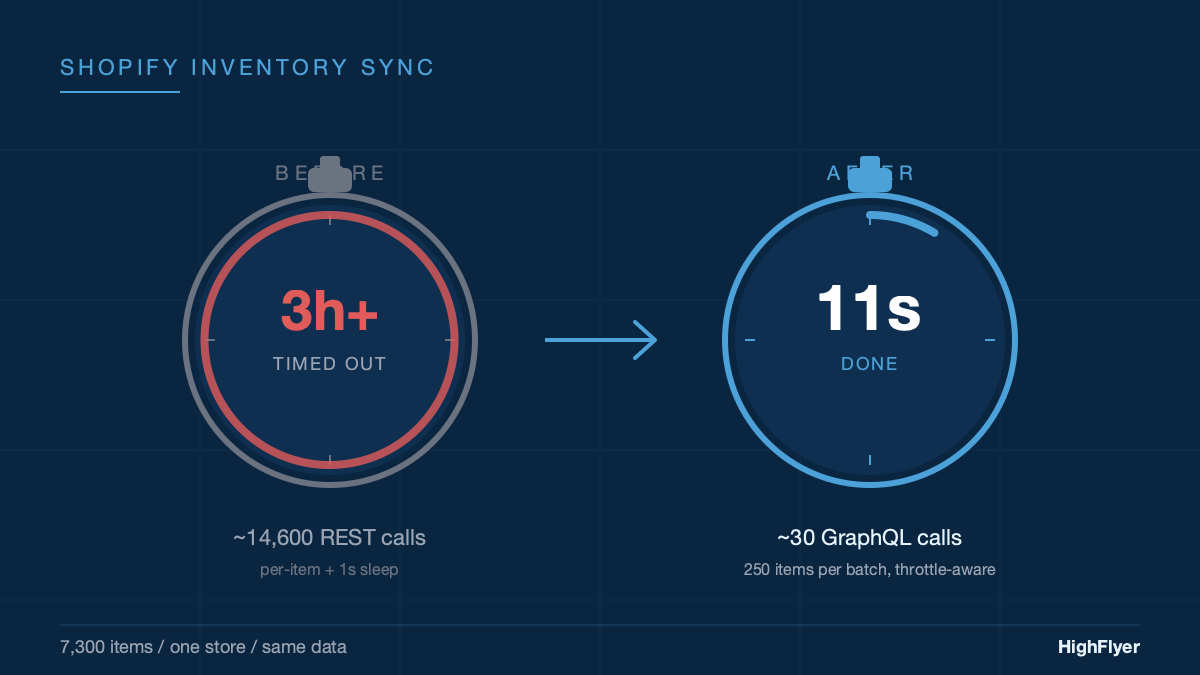
The short version. Stock sync for a typical 7,300-item store used to take more than three hours. Often it timed out before finishing, meaning the website was running on yesterday’s numbers without anyone noticing. We rewrote it. The same job now finishes in about eleven seconds. The harder lesson, and the one we want to share, is that we kept extending the timeout for months before admitting that the timeout was never the real problem.
What the Sync Actually Does
When a business runs its storefront on Shopify and its stock, orders, and accounting in an ERP behind the scenes, something has to keep stock levels in agreement between the two. Sell five units on the website, the ERP needs to reduce stock. Receive a delivery into the warehouse, Shopify needs to know that 200 more units are available.
We build and maintain a connector that does this for ERPNext and for our own ERP product, NexWave. It runs in the background on a schedule, pushing stock levels from the warehouse system into Shopify so the storefront shows the right numbers.
The piece that broke was the stock-level push. For a store with a few hundred items, it had been fine for years. For a store with several thousand, it had become unusable.
Why It Was Slow
The old version did its work one item at a time. For each item, it asked Shopify “tell me about this product”, then asked Shopify “update the stock on this product”, then paused for a second so Shopify would not block it for asking too quickly. (Shopify, like every large platform, limits how often anyone can call its system.)
For a store with 7,300 items, that is around 14,600 questions and answers, plus 7,300 one-second pauses. More than two hours of waiting before you even count the time the questions and answers themselves take. In practice it ran longer: when Shopify briefly blocked us, we retried. When the server hosting the ERP got a routine restart, the sync got cut off partway through. Some items were not set up to be tracked on the Shopify side; the old code treated those as failures and gave up on the entire run.
The most damaging part was that the sync looked like it was working. The logs said “running.” Nobody got an alert. But the website was quietly serving stale stock figures, and the only way the team noticed was when a shopper ordered something the warehouse no longer had.
The Patches That Did Not Fix It
Before we rewrote anything, we did what most teams do: patched the obvious things.
We made the sync politer so Shopify would stop blocking us. We stopped duplicate runs from queueing up behind each other. We raised the timeout from 30 minutes to 60 minutes, because some stores were still being cut off. Then to 3 hours, because the largest stores were still being cut off.
At three hours, we stopped. Nothing about “tell Shopify the current stock levels” should take three hours. We had been treating the timeout like a dial to turn. It was actually a warning light. The design was wrong, and no amount of extra time was going to fix it.
The Rewrite, In Plain Terms
Shopify offers a second way of asking the same question that has a fundamentally different shape. Instead of one product per trip, you can send 250 products in a single trip. Instead of pausing for a second between every item to avoid getting blocked, Shopify now tells you on every response how much capacity you have left, so you only slow down when you are actually close to the limit.
Two changes, two enormous effects:
- Send products in batches of 250. A 7,300-item store now needs about 30 trips to Shopify instead of 14,600. That single change accounts for most of the speedup.
- Slow down only when you have to. Most of the time the system sends the next batch immediately. Only when Shopify signals it is getting busy does it pause, and even then only as long as needed.
We added one more thing. The old version asked Shopify a separate question for every product on every run: “what’s the identifier you use for this product?” We changed it to remember the answer from the first time it asked. From then on, every subsequent run reads the answer locally and goes straight to updating the stock.
What Happens When Things Go Wrong
A real integration has to handle bad days as well as good ones. The new sync separates problems into three categories, instead of lumping them all together:
- Shopify is asking us to slow down. We do what it asks, wait, and try once more. If it still fails, we record that batch as failed and move on.
- Shopify itself is having a bad moment. Sometimes their servers return errors that have nothing to do with us. We wait briefly, try again, and after a couple of attempts we give up cleanly with a clear message.
- Something is genuinely wrong on our end. Bad credentials, a broken setup, a product that does not exist on Shopify. These fail fast and produce a real error message in the operator’s log, instead of pretending the run “kind of worked”.
This matters more than it sounds. Under the old system, an expired Shopify password caused 7,300 items to be marked as “failed to sync” for hours, while the log still read “running.” Under the new system, the first batch fails with a clear “Shopify rejected our credentials” message, the run stops, and the operator gets told what to fix.
Three Small Safeguards Worth Stealing
Most of the value in the rewrite is in the big design change. But three small things came along with it that we think every scheduled background job should copy:
If you press the manual sync button, it actually syncs. The old “Sync Now” button respected the same frequency rules as the scheduled job. If you pressed it within an hour of the last run, it quietly did nothing. We have all worked with software like that and we have all wondered why we bothered. The new button bypasses the rules. If you pressed it, you meant it.
A failed run does not pretend it succeeded. The old version updated its “last successful sync” timestamp at the start of a run, before knowing the outcome. A completely broken run therefore looked like a recent success, and the next scheduled run skipped, because “we just synced.” The new version only advances the timestamp if at least one batch actually went through. A failed run leaves the timestamp where it was and the next scheduled tick tries again.
We can switch a single store off in 30 seconds. Occasionally a specific store has unusual data that needs investigation. Rather than push a hotfix that affects every customer, we can pause the sync for that one store in seconds, look at it, and bring it back once it is sorted.
None of these are technically sophisticated. They are the difference between an integration you can sleep at night with and one you cannot.
The Numbers
On a representative store (around 7,300 items, single warehouse, normal operating conditions):
| Approach | Trips to Shopify | Total time |
|---|---|---|
| Old: one product at a time | ~14,600 | Over 3 hours, often timed out |
| New: 250 products at a time | ~30 | About 11 seconds |
Same job. Roughly 486 times fewer trips to Shopify. Roughly 1,000 times less waiting.
We also relaxed two settings that had been compensating for the slow version. The default check interval moved from 30 minutes to 60 minutes, because a stock push that takes eleven seconds does not need to run every half hour. The background scheduler that wakes the sync up now checks every ten minutes instead of every five, for the same reason.
The Lesson, Which Is Not About Shopify
The most useful thing in this story is not the technical change. It is the eight months we spent before making it.
We raised the timeout three times. Each time felt like a fix. Each time we agreed, without saying it out loud, that the right answer was “let the loop run longer.” The real budget was always tens of seconds, because that is what the business actually needs. Nothing about “push current stock levels to Shopify” should take a coffee break, let alone a working morning.
Timeouts are diagnostic tools. If you find yourself, or your software team, repeatedly raising the same one, the answer is almost never “raise it again.” Something underneath is wrong, and the longer you treat the symptom, the longer the underlying issue collects interest.
We see this pattern across customers we audit. Nightly jobs that nominally “work” but take all night. Scheduled syncs that “ran” but did not finish. Reports that “completed” against half the data. The honest signal is in the trend. If a job that used to take five minutes now takes ninety, the question is not “can we wait longer for it?” It is “what changed, and is the design still right for what we are asking it to do?”
That question is almost always the one worth answering.
The connector itself is open source. If you run a Shopify storefront in front of ERPNext or NexWave, or you build integrations and want to see how we structured the rewrite, the code is on GitHub. The rewrite landed in our version-15 and version-16 releases. We keep it open because this kind of plumbing should be shared.
If You Need This Built
HighFlyer builds and maintains integrations for NZ businesses: Shopify, WooCommerce, Xero, Stripe, Akahu, bank feeds, payment gateways, and anything else your stack talks to. We maintain the open-source ERPNext Shopify connector described above, and we build custom connectors when the off-the-shelf options do not fit.
Tags
About the Author

Imesha Sudasingha
Co-founder & CTO
Imesha is the Co-founder & CTO at HighFlyer and a member of the Apache Software Foundation with 10+ years of experience across integration, cloud, and AI. He looks after the Shopify integration that this post describes.
A monthly note for SME operators
On technology, AI, and digitalisation. One real story, two trends, and one quick win each issue.
Recent Posts
Categories
You May Also Like

When There Is No Straight Answer: How Agentic AI Solved a MacBook Sleep Panic
An older HighFlyer MacBook charged and worked normally after its battery was replaced—until the lid was closed. Four panic reports,...
Read More
How We Actually Use AI on Real Customer Work
Eight months of unresolved accounting drift. 3,600 historical transactions. One working session to untangle it, because AI was sitting alongside...
Read More
What We Learned Putting an AI Assistant Inside a Live Business System
An AI that gives a finance team an off-by-a-dollar answer loses their trust forever. Here are the five things we...
Read More