How We Actually Use AI on Real Customer Work
Most content about “AI for engineering” is either hype (“AI will replace developers”) or demo-floor theatre (watch me generate a TODO app with a prompt). Neither is useful if you are running a real business with real systems behind it. The honest question for a consultancy that ships integrations and ERP work is: what does AI actually change about how we do the job? This is the answer, with three specific cases from the last few months.
The short version. AI is not writing production code for us. It is shortening the investigative half of engineering, the part that used to mean days of spreadsheet exports, pivot tables, and squinting at logs. A recent example: a customer’s stock accounts had disagreed with the underlying stock movements for eight months. 3,600 historical transactions. Four overlapping causes. A hidden double-counting bug in the opening-balance import. One engineer, one working session with AI alongside, and every account matched to the cent. The engineer still owned every decision. AI did the work that used to take a week of manual effort.
What This Is Not
Before the specifics, the guardrails.
- AI is not pointed at production. Our standard pattern is to take an up-to-date backup of the customer’s database and restore it to a sandbox on our local machine. AI works against that restored copy. The backup is usually from the last 24 hours, current enough for any forensic or historical investigation. Humans apply the resulting fixes to production after the session concludes.
- AI does not write code that ships unreviewed. Every change goes through the same review pipeline as anything written by a human. Tests, type checks, and the usual hurdles apply. AI does not get a fast lane.
- AI does not replace business decisions. When the investigation reveals a choice (cancel and rebook, or amend? Include credit-balance customers in statements, or not?), the engineer talks to the customer. AI can lay out the trade-offs. It does not pick one.
With those out of the way.
Case One: Eight Months of Accounting Drift, One Session
A customer’s stock accounts and their stock ledger (the underlying record of every stock movement) had not agreed since the system went live, eight months earlier. Every month the accountants had been quietly posting manual corrections to paper over the gap. Each workaround compounded the underlying problem rather than fixing it. By the time we looked at it, the situation was:
- A four-figure discrepancy between the Ingredients, Packaging, and Finished Goods stock accounts and what the underlying stock ledger said they should be.
- Dozens of manual journal entries, some correcting, some making it worse.
- A persistent “phantom” balance against a dummy customer that nobody could explain.
- Three cancelled stock entries whose stock movements had been reversed, but whose accounting entries never had.
- A failed item-valuation recalculation that had been stuck for months.
A year of someone’s life could have disappeared into that investigation. The reason it did not is the workflow.
Step 1: Take a Backup, Restore Locally
We never let AI touch a live customer system. The first step of any investigation like this is to take a recent backup (in this case, taken the evening before) and restore it to a sandbox on our local machine. That sandbox has all of the customer’s data, the full shape of their setup, and none of their running integrations. We can ask anything, run anything, try anything, and the customer never sees.
The backup being from the previous day matters. For forensic work we need every transaction the customer has made up to the moment of investigation. A week-old backup would have missed the two journal entries the accountant posted yesterday, which might have been exactly the ones creating the phantom balance.
Step 2: Ask, Read, Follow the Thread, Ask Again
With the sandbox ready, the working pattern is simple:
- The engineer asks a question.
- The AI runs a safe, read-only query against the sandbox and returns the result.
- The engineer reads the result, forms the next hypothesis, and asks the next question.
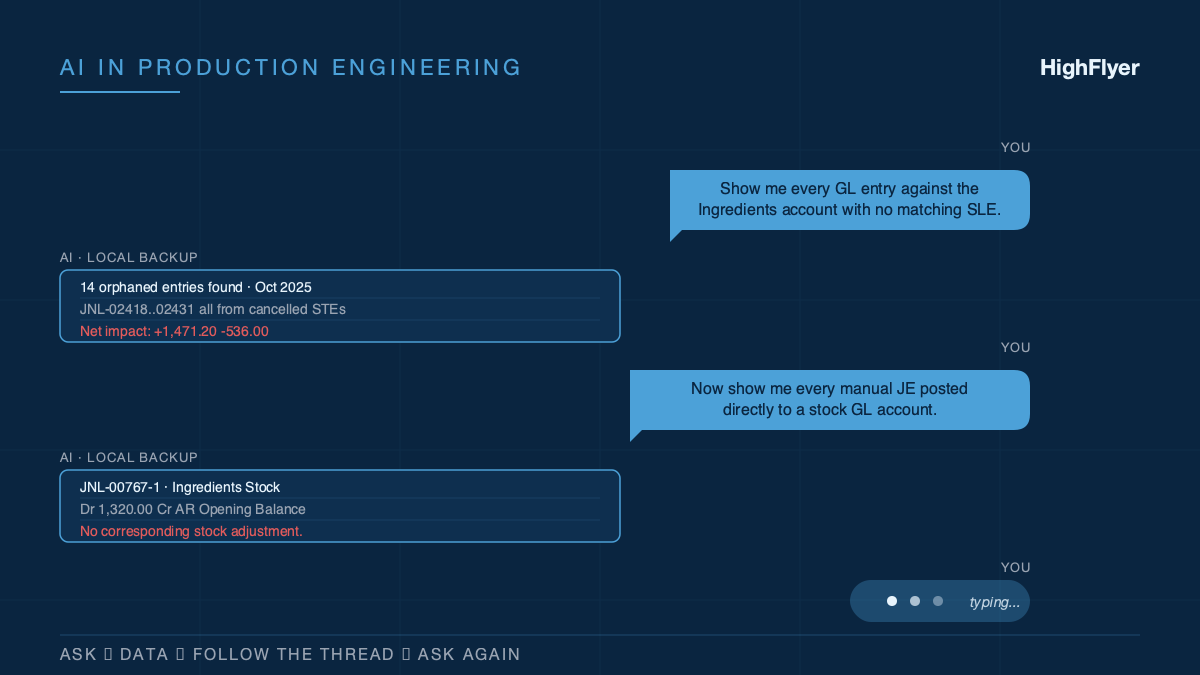
The first question was: “Show me every accounting entry against the Ingredients account that has no matching stock movement, ordered by date.” The AI returned 14 orphaned entries from cancelled stock transactions back in October. That lead was too clean to be the whole story.
Next: “What is the total impact of those orphaned entries on each stock account?” $1,471 overstating Ingredients, $536 understating Finished Goods. Numbers that matched one of the gaps exactly.
Then: “Show me every manual journal entry posted directly to a stock account.” That surfaced journal entry JNL-00767-1, posting $1,320 directly to Ingredients with no matching stock adjustment. Another orphan, which explained more of what was left.
The pattern kept going. Three packaging items had a small disagreement between their current stock level and the history of their movements, totalling $1,128.63. That turned out to be a stock-value recalculation issue. A ten-cent rounding drift on one Finished Goods item required re-running 14,969 historical stock movements to clean up. And, deep in the opening-balance import from the customer’s previous accounting system, a “Reverse Opening Balances” journal entry had been debiting a temporary receivables account every time the opening invoices were imported, even though the invoices themselves already offset it. That was the phantom: a dummy customer sitting on a $295,000 receivables credit nobody could find, because it was spread across months of innocent-looking imports.
Step 3: Simulate Every Fix Before Touching Anything
For each underlying cause, the next question was “if I apply this specific correction, what does the stock account look like afterwards?” The AI built running-balance simulations against the restored backup. We got to see the post-fix state for all four stock accounts before a single live change.
Only after every simulation showed zero drift did anything get applied to the live system. The human applied it, manually, with a documented way to undo if anything looked wrong.
Outcome
End of the single session:
- Every stock account matched the underlying stock ledger exactly. $0.00 drift across Ingredients, Packaging, Finished Goods, and In Transit.
- The $295,000 phantom receivables credit identified, explained, and resolved.
- The stuck item-valuation recalculation diagnosed and restarted (one warehouse had a broken batch-tracking setup left over from the opening-stock import).
- A short remaining-action list for the accountant, written up clearly.
What would have taken a week of an engineer plus a week of an accountant took a few hours of one engineer, mostly because AI did the shape of work that used to be “export to CSV, build a pivot table, find the outliers, export again.”
Case Two: The Three-Hour Timeout That Was Never a Timeout
Different customer, different problem. A Shopify stock sync had been timing out. We had already raised the timeout three times, from 30 minutes to 60 minutes to 3 hours. It was still timing out on the largest store.
The temptation, in that situation, is to raise it again. AI did not fix the problem; it asked a different question.
“How many trips to Shopify does this sync make for the largest store?” About 14,600. “At the current one-second pause between calls, what is the theoretical minimum run time?” Over four hours. “Can the way we are currently asking Shopify, one product at a time, ever support a sub-hour sync at this size?” No.
The whole timeout-bumping exercise had been treating the dial as the thing to adjust. The AI-assisted line of questioning reframed the timeout as a warning light, not a setting. We rewrote the sync to use Shopify’s batch interface, which lets us send 250 products in a single trip instead of one at a time, and the same store now syncs in eleven seconds. Full write-up of that rewrite is in From 3 Hours to 11 Seconds.
The value of AI here was not code generation. It was the willingness to ask the boring arithmetic question that a tired engineer had stopped asking.
Case Three: Four Missing Orders and One Character
A food manufacturer thought their orders were not syncing from their online store into their ERP. The integration logs said “running successfully.” The customer was right; the logs were wrong.
The path to the root cause was another ask-read-follow sequence:
- “Show me the most recent successful runs of the order sync.” Every hour for two weeks. Never an error.
- “Now show me the ‘last successful sync’ timestamp over time.” It had not moved since the integration was first turned on.
- “Where is the sync trying to save that timestamp?” It was trying to save it into a settings record that did not exist on the system.
- “What happens when the underlying framework is asked to save a value to a setting that does not exist?” It silently ignores the write and returns no error.
A single mistyped character in the name of a settings record. Every hour, the sync was re-fetching all 3,500 historical orders because it believed it had never successfully synced anything. It timed out before reaching the tail of the queue, which is exactly where the four genuinely missing “retry” orders were sitting.
AI did not find the bug. An engineer who knew the framework deeply would have found it the same way, eventually. AI made the reading faster.
The full case study, including how we rebuilt the sync to make this class of silent failure impossible going forward, is at Finding 4 Lost Orders Inside a Broken WooCommerce Sync.
The Pattern
If you look across the three cases, the workflow is not about AI writing code. It is about AI compressing the investigation loop:
- Engineer asks a question.
- AI queries the restored sandbox (or reads source code, or parses logs) and returns clear data.
- Engineer interprets the result, forms the next hypothesis, asks again.
Each iteration used to cost minutes of context switching: export, build a pivot table, find the outliers, paste back into the editor, think, repeat. Now each iteration is a typed sentence. Twenty iterations in a session instead of five. You get to the bottom of problems you would previously have abandoned as unfixable.
What This Changes About the Work We Take On
Before this became part of our workflow, there was a class of engagement we routinely turned down: “our accounts have been wrong for months, we do not know why, can you come and figure it out?” Those projects looked like two weeks of work before you even knew what the work was. The uncertainty made them difficult to scope and unpleasant to price.
Now those investigations are plausible inside a day, sometimes less. The upstream effect is that we can take on:
- Forensic data reconciliation on legacy systems.
- Migrations off platforms where the data has drifted from the underlying truth.
- Performance investigations on pipelines that have “always been slow.”
- Compliance reviews against transactional systems where the documentation is out of date.
Not because AI makes us magical. Because the expensive part of these projects (the investigative phase) is now smaller than the implementation phase, instead of the other way around.
What We Tell Clients
When a prospect asks whether we “use AI”, the answer is yes, with context.
- We do not ship AI-written code without human review.
- We do not connect AI to live customer systems. It works against a restored local copy.
- We do not use AI to generate your business logic. The logic is yours; we build it with you.
- We use AI the way a careful engineer uses a calculator: a tool that makes specific parts of the job faster, and that still requires the engineer to understand what the tool is doing and whether the answer looks right.
If a consultancy tells you AI is their value proposition, be careful. AI is a capability. The value is still whether the team can diagnose your actual problem, design the right solution, and ship something that works in production on a Monday morning. Hire for that. Assume AI is table stakes in every modern engineering shop and judge the people.
Where This Goes Next
Two things will get better.
Faster sandboxing. Restoring a customer backup, masking sensitive fields, and pointing a local environment at it is still a 20-minute manual process. It should be a one-click step that spins up a fresh sandbox per investigation. We are working on it.
Longer investigations. Some problems do not fit in a single session. They span weeks of changing data and need the investigation to re-run against fresh data each time. That is a different way of using AI, closer to having a junior analyst doing the daily groundwork than to pair debugging. We have not made it routine yet.
What is clear is that the boundary between “things we can take on” and “things we have to decline” has moved, and it will move again.
If You Need This Built
HighFlyer builds and fixes integrations, ERP customisations, and data plumbing for New Zealand businesses. We use AI the way we would use a senior colleague: in the investigation, in the pattern-spotting, in the simulation, but never as the engineer of record.
Tags
About the Author

Imesha Sudasingha
Co-founder & CTO
Imesha is the Co-founder & CTO at HighFlyer and a member of the Apache Software Foundation with 10+ years of experience across integration, cloud, and AI. He leads the AI-assisted engineering practice at HighFlyer.
A monthly note for SME operators
On technology, AI, and digitalisation. One real story, two trends, and one quick win each issue.
Recent Posts
Categories
You May Also Like

When There Is No Straight Answer: How Agentic AI Solved a MacBook Sleep Panic
An older HighFlyer MacBook charged and worked normally after its battery was replaced—until the lid was closed. Four panic reports,...
Read More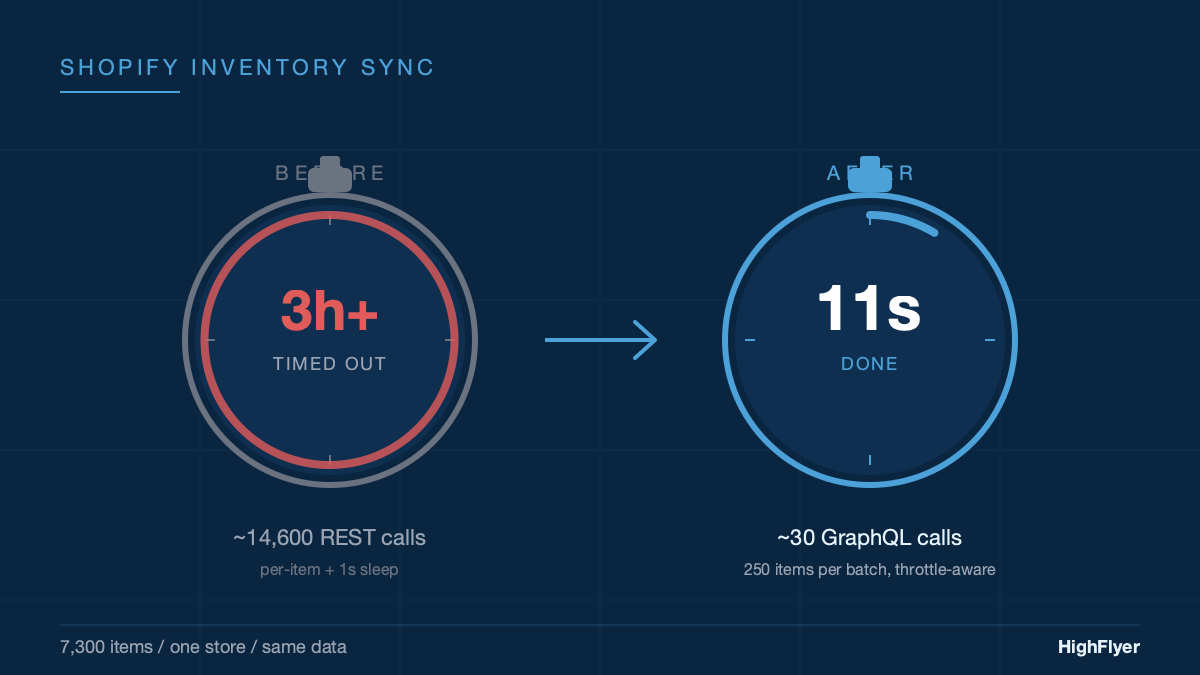
From 3 Hours to 11 Seconds: Fixing a Shopify Stock Sync That Kept Timing Out
We kept bumping the timeout. First to 60 minutes. Then to 3 hours. It still timed out. The timeout was...
Read More
What We Learned Putting an AI Assistant Inside a Live Business System
An AI that gives a finance team an off-by-a-dollar answer loses their trust forever. Here are the five things we...
Read More