The Xero Integration That Survives a Bad Day
Most businesses we work with run Xero for accounting and something else (an ERP, a warehouse system, a custom platform) for everything that happens before the invoice. The two systems need to agree. When they do not, the symptoms are quiet at first and expensive later: duplicate invoices in Xero, missing invoices that should be there, balances that do not reconcile, and an accountant who stops trusting the software.
This is about the integration we built between our own ERP (NexWave) and Xero, and the design choices that decided whether it survived a bad day or not.
The short version. A Xero integration that works on a good day is easy. One that works on a bad day, when the server restarts mid-push, when an employee cancels an invoice during the very second it is being sent, when a tax code is missing, when Xero itself is having a slow afternoon, is a different exercise. We made five specific design choices in the connector that pushes invoices from NexWave to Xero. This is what they are and why each one mattered.
What “Just Send the Invoice to Xero” Actually Means
The simplest possible Xero integration is “when someone saves an invoice in your local system, send it to Xero.” On a quiet afternoon with one user and a healthy network, this works. In real conditions, the same simple logic will, in order:
- Make every invoice save feel slow, because saving now waits for Xero.
- Get interrupted halfway through a send. The invoice is saved locally, but Xero never received it.
- Get re-tried after the system restarts, and now there are two invoices in Xero for the same sale.
- Get caught by a user who cancels the invoice in the middle of the send. Xero ends up with an invoice the local system says was never created.
- Fail because one line on the invoice has no Xero-recognised tax code. The user sees “something went wrong” and the accountant has to chase support.
Each of these is a real failure mode we have seen in real production systems. Here is what we did about each.
Decision 1: Don’t Make the User Wait for Xero
When an employee in your finance team clicks “save” on an invoice, the save needs to feel instant. A round trip to Xero takes anywhere from half a second on a good day to thirty seconds on a bad one. Asking your team to wait that long, for every single save, is a small piece of friction that adds up to a complaint that the software is “slow.” Slow software gets used reluctantly. Reluctantly-used software gets bypassed.
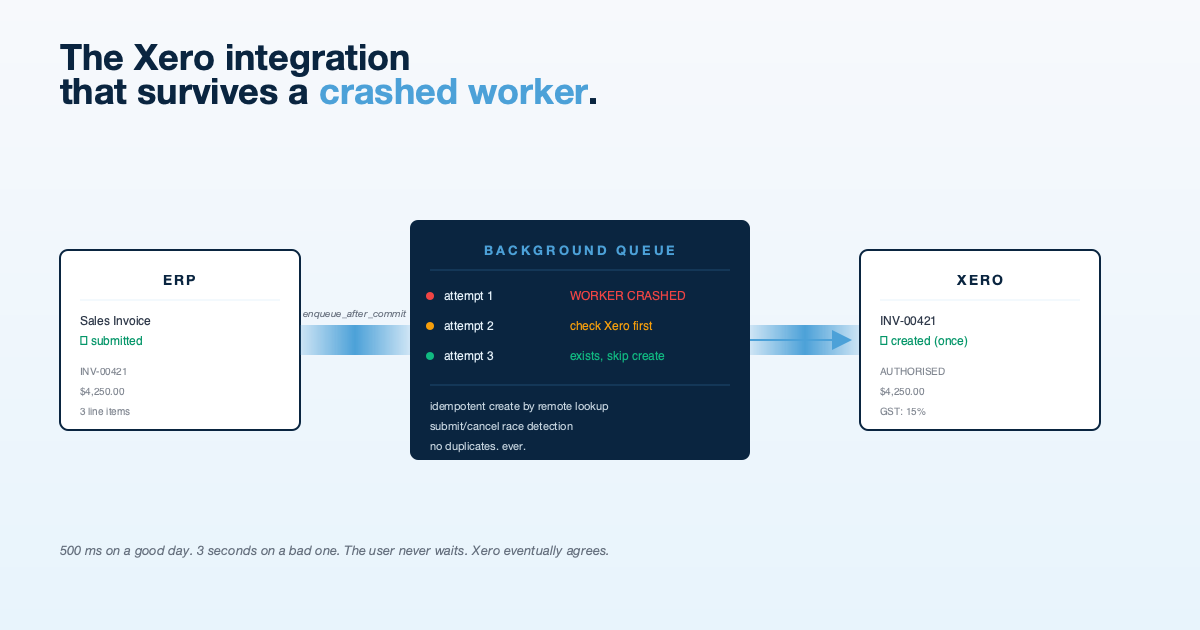
Our integration saves the invoice locally first, then quietly queues the Xero push to happen behind the scenes. Within milliseconds of clicking save, the employee sees “submitted” and moves on. If Xero is slow, the background system handles it. If the background system is interrupted, it picks up where it left off when it restarts. The team’s day does not depend on Xero’s mood.
There is a subtle ordering choice in here that matters. We only queue the Xero push if the local invoice actually saved. If the save fails for any reason (validation, permissions, anything), the Xero queue gets nothing, because there is no real invoice to send. We do not push imaginary invoices.
Decision 2: Ask Xero, Don’t Trust a Local Flag
The naive way to avoid duplicate invoices is to mark each one locally as “sent to Xero” once we have sent it. The next time the system runs, it skips invoices that are already marked sent.
This works until the background system gets interrupted at exactly the wrong moment: after Xero has accepted the invoice, but before we manage to write “sent” against the local record. The next retry sees the local record as “not sent” and pushes the invoice to Xero a second time. Now you have two invoices in Xero for one sale, and an accountant who is going to be unhappy.
Our integration does it the other way around. Before creating an invoice in Xero, we ask Xero: do you already have one with this invoice number? If yes, we record it as synced and move on. If no, we create it. Xero, not our local record, is the source of truth for whether the invoice has been pushed.
The benefit is that the background system can be interrupted at any point and the next retry produces the same outcome as the original attempt. No duplicates. No drift. Restart whatever you like.
Decision 3: Re-check the Local Status After Xero Has Replied
A real race we have seen in production: an employee submits an invoice. The background system picks it up and starts pushing to Xero. Halfway through that push (which can take a few seconds), a second employee cancels the same invoice locally because they realised it was wrong.
Without a safeguard, Xero ends up with an invoice that the local system says was cancelled. The next accountant who reconciles Xero against the local system gets confused, and “the integration created a ghost invoice” becomes a support ticket.
Our integration handles this by re-checking the local invoice’s status the moment Xero confirms the create, but before declaring the push complete. If the invoice was cancelled while we were talking to Xero, we immediately void the Xero copy. The window in which Xero is briefly out of sync is measured in seconds, not days.
This does not eliminate the race entirely, but it closes it within seconds rather than leaving it open until somebody happens to notice.
Decision 4: Tax Code Mapping With a Sensible Fallback Order
Tax codes in Xero are strict. Every line on an invoice needs a Xero-recognised tax code, and the code has to exist in the user’s Xero organisation. If a line has a tax setting our integration cannot map to Xero, the push fails. The user sees an error.
The question is what kind of error. “Something went wrong” is useless. “Could not push to Xero because no tax mapping exists for item ACME-WIDGET. Please add a mapping in Xero Sync Settings” is actionable. The user can do something with the second message.
To produce a useful message, our integration tries to resolve the tax code from four places, in order:
- Whatever tax setting is on the specific invoice line.
- The document-level tax template, which applies across the whole invoice.
- The default tax setting on the item itself.
- The company-wide default tax.
If all four fall through with nothing matching the user’s Xero tax codes, we stop, and the error message names the item and the missing mapping. The user can fix it once and the push works thereafter. Shipping and freight follow the same fallback. Credit notes link back to the original invoice in Xero. Multi-currency invoices push with the correct tax-exclusive line amounts so Xero’s GST report adds up the same as the local one.
Most of the support tickets the connector does not generate live in this section.
Decision 5: A Way to Rescue Stuck Documents
Even with all of the above, there are situations where a push is “in flight” and the background system has gone away. Maybe the server was restarted. Maybe it was under heavy load. Maybe Xero was unavailable for an hour. Documents in this state sit in a half-sent condition, and without a clear way to handle them, an operator has no recourse beyond raising a ticket.
The connector ships with a Xero Sync Log: every attempt to push every invoice, with its current status, the timestamp, and any error message. Documents that have been “queued” for too long (we use 30 minutes as a default) get flagged in the log with a one-click retry. Because the retry logic is the same as Decision 2, retrying a document that actually did succeed quietly confirms it. The accountant can press retry as many times as they like without risk.
There is also an “orphan check.” If the local system shows an invoice as cancelled but Xero still has it as active, the log flags it and offers a one-click void. These small affordances are the difference between “the integration broke and we need a developer” and “the integration had a hiccup and our accountant fixed it in ten seconds.”
The Bits We Deliberately Did Not Build
A reliable integration is also defined by what is not in it. We chose not to build:
- Real-time, instant sync. Invoices arrive in Xero within seconds, not milliseconds. For credit control purposes that is more than fast enough, and chasing instant adds a lot of complexity for no operational gain.
- Two-way sync that updates the local system when something changes in Xero. That is a different problem entirely, and we did not blur the two.
- A separate audit trail or reporting layer. The Sync Log is the audit trail. Every attempt, retry, void, and error is a row that an accountant can read.
Scope discipline matters. The connector does one job, push invoices, credit notes, and purchase invoices from our ERP to Xero. It does that one job reliably. That is enough.
The Underlying Pattern
Reading back through the five decisions, the pattern is consistent: every choice we made assumes that something will go wrong. The server will be interrupted. The user will cancel mid-push. The network will drop. The tax mapping will be missing.
The integration is not reliable because we wrote defensive code on top of a fragile design. It is reliable because the design itself makes the wrong outcomes very difficult to produce. Asking Xero before creating means duplicates cannot happen. Re-checking the local status after the API call means silent disagreement between the two systems cannot persist. Doing the push in the background means a slow Xero does not slow the user down.
If you are buying or commissioning an integration, the question that separates a real one from a demo is not “does it work?” It is “what does it do when it doesn’t?” Ask the vendor what happens when their server restarts halfway through a push. If the answer is “that doesn’t happen,” the integration is a demo that has not met production yet.
If You Need This Built
HighFlyer builds systems integrations and custom software for New Zealand businesses. Xero, Shopify, WooCommerce, Stripe, Akahu, bank feeds, payment gateways. The ones we build are the ones you do not have to think about after they ship.
Tags
About the Author

Imesha Sudasingha
Co-founder & CTO
Imesha is the Co-founder & CTO at HighFlyer and a member of the Apache Software Foundation with 10+ years of experience across integration, cloud, and AI. He designed the Xero integration described in this post.
A monthly note for SME operators
On technology, AI, and digitalisation. One real story, two trends, and one quick win each issue.
Recent Posts
Categories
You May Also Like

When There Is No Straight Answer: How Agentic AI Solved a MacBook Sleep Panic
An older HighFlyer MacBook charged and worked normally after its battery was replaced—until the lid was closed. Four panic reports,...
Read More
How We Actually Use AI on Real Customer Work
Eight months of unresolved accounting drift. 3,600 historical transactions. One working session to untangle it, because AI was sitting alongside...
Read More
From 3 Hours to 11 Seconds: Fixing a Shopify Stock Sync That Kept Timing Out
We kept bumping the timeout. First to 60 minutes. Then to 3 hours. It still timed out. The timeout was...
Read More